What Is a Body Visualizer?
A body visualizer is a free online tool, also called a 3D body simulator, body measurement simulator or body model tool, that turns your height, weight and body measurements into a rotatable human figure so you can see how those numbers combine into a shape. Enter your numbers in the tool above and the model updates instantly. There is no signup, and nothing is uploaded.
Numbers on a scale or a tape measure are hard to picture. Two people can both weigh 150 pounds and look nothing alike, because height, frame and the way the body carries its weight change the picture. A body visualizer closes that gap by drawing the figure your numbers describe, from the front, the side and the back.
This body visualizer lets you build a body from ten measurements — height, weight, bust or chest, waist, hips, shoulder width, inseam, neck, upper arm and thigh — and draws it as a female, male or neutral body model. It then reads the result back to you as BMI, waist-to-hip ratio, waist-to-height ratio, an estimated body fat percentage and a body shape name that matches our body type calculator.
People use it to answer “what does my body look like?”, to preview a weight or measurement change before and after, to compare the heights and weights of two people side by side, to see how a tape measurement turns into shape, and as a rough proportion reference for drawing or character design.
- Rotatable 3D-style model — front, ¾, side and back views, drag to rotate, or spin 360°.
- Different male and female bodies — shoulders, chest, hips, legs and more follow real anatomy.
- Compare A/B and Overlay — two bodies at the same scale, or a goal outline over your current body.
- Live analysis — BMI, WHR, WHtR, body fat estimate and body shape update as you type.
- Private by design — everything runs in your browser; nothing is uploaded or stored.
How to Use the Body Visualizer (Step by Step)
You can get a first result in about 30 seconds with only your height and weight. Add measurements when you want the model to match a specific body.
Choose a model and your units
Pick Female, Male or Neutral under Model, then choose cm / kg or in / lb under Units (U.S. visitors: in / lb). The model changes the whole body build, not just a label, and switching keeps your proportions.
Enter your height and weight
Type a number or drag the slider. With Auto-balance on, the visualizer fills in typical bust or chest, waist, hips and limb measurements for that height and weight, so you get a believable body right away. The weight slider shows the range available for your height (BMI 16 to 60).
Add your real measurements
Enter bust or chest, waist and hips from a tape measure (see the table below). Tap the ? next to a field for a one-line measuring tip. The figure and the dashed measurement lines update as you type.
Fine-tune with advanced measurements
Open Advanced measurements (it is open by default) for shoulder width, inseam, neck, upper arm and thigh. Inseam changes leg-to-torso proportion, and neck plus waist feed the body fat estimate.
Or start from a body shape
Tap a chip under Try a shape — Hourglass, Pear, Apple, Inverted triangle and more for the female model; Trapezoid, Oval, Rectangle and more for the male model — to set bust or chest and waist to that pattern, then adjust to taste.
Rotate and inspect the model
Use Front, ¾, Side and Back, drag the figure, press Spin, or focus the model and use the arrow keys (hold Shift for bigger steps). Keep Measurement lines and Height ruler on to see where each measurement sits.
Read the live analysis
BMI, waist-to-hip ratio, waist-to-height ratio, estimated body fat and body shape sit beside the figure (under it on phones). Tap Full breakdown for reference ranges and notes.
Compare two bodies
Choose Compare A/B for side by side or Overlay to lay B’s outline over A. Use the Edit A and Edit B tabs, Copy A→B to start B from A, and Swap to flip them. Both figures use the same scale, and a table lists every change.
Save or share your result
Tap Download image for a PNG with your measurements, or Copy share link to recreate your exact setup later. Your numbers live in the link itself, not on our servers.
Auto-balance, in one line: when it is on, changing height or weight rescales your other measurements and keeps your proportions; when it is off, only the value you touch changes. Leave it on for quick “what if” tests and switch it off to edit one measurement at a time.
How to Take Your Body Measurements
Accurate inputs give a more accurate figure. Use a soft, flexible tape measure, stand relaxed, keep the tape snug but not tight, and take each measurement twice. Measure bare or in thin clothing. Use the in / lb switch if you measure in inches — the visualizer converts automatically (1 inch = 2.54 cm).
| Measurement | Where to measure | Tip |
|---|---|---|
| Height | Standing straight against a wall, barefoot, heels together. | Look straight ahead; use a flat book on your head to mark the wall. |
| Weight | On a flat floor, in the morning after using the bathroom. | Use the same scale each time so changes are real. |
| Bust (women) | Around the fullest part of the bust, tape level across your back. | Wear a thin, non-padded bra. |
| Chest (men) | Around the fullest part of the chest, just under the arms. | Breathe normally — don’t puff out your chest. |
| Waist | Around the narrowest part of your torso, usually just above the navel. | Exhale naturally; don’t pull your stomach in. |
| Hips | Around the fullest part of your hips and buttocks, feet together. | Keep the tape parallel to the floor. |
| Shoulder width | In a straight line from the tip of one shoulder to the tip of the other. | Ask someone to help so the tape stays straight. |
| Inseam | From the crotch to the floor along the inside of the leg. | Stand barefoot; a trouser inseam is a different number. |
| Neck | Around the base of the neck, just below the larynx. | Keep your head level and shoulders relaxed. |
| Upper arm | Around the midpoint between shoulder tip and elbow, arm relaxed. | Don’t flex — relaxed measurements are comparable over time. |
| Thigh | Around the fullest part of the upper thigh, just below the crease. | Stand with your weight even on both feet. |
The World Health Organization’s waist protocol uses the midpoint between the lowest rib and the top of the hip bone, while the narrowest-point method above is the common at-home approach. The two can differ by an inch or more, which matters near waist-to-hip ratio cut-offs. For common mistakes and every landmark in detail, see our full guide to how to measure your body correctly.
What Does My Body Look Like? How to Read Your Result
Three things shape the figure. Height sets its scale. Weight and your girth measurements — chest or bust, waist, hips, thigh, upper arm — set how full it looks. Proportions, the relationships between shoulders, chest or bust, waist and hips, set the shape.
Same weight, different heights
Think of the tool as a height and weight visualizer: weight alone says little about body size or appearance. At 150 pounds, a person who is 5′2″ has a BMI of about 27.4, while a person who is 5′10″ has a BMI of about 21.5 and a visibly leaner outline. To see it yourself, switch to in / lb, set body A to 62 in and 150 lb, choose Compare A/B, and set body B to 70 in and 150 lb.
Front, side and back views tell different stories
The front view shows the width of your shoulders, waist and hips. The side view shows depth — bust or chest projection, the belly line and the glutes. The back view shows shoulder width and hip shape. Check all three before you decide a measurement is “off”.
Why the figure may not look exactly like you
The visualizer draws from the numbers you enter. It cannot see muscle, bone structure, posture or where your body carries fat, so two people with identical measurements can look different in a mirror. If the model looks wrong, re-measure, fill in the advanced fields, and adjust one value at a time with Auto-balance off.
BMI Visualizer: What Your BMI Looks Like
Body mass index (BMI) compares your weight with your height: weight in pounds ÷ height in inches² × 703, or kilograms ÷ meters². The CDC groups adult BMI into four categories. It is a screening measure, not a diagnosis.
| BMI category (adults 20+) | BMI (kg/m²) |
|---|---|
| Underweight | Below 18.5 |
| Healthy weight | 18.5 to 24.9 |
| Overweight | 25.0 to 29.9 |
| Obesity | 30.0 or higher (class 1: 30–34.9 · class 2: 35–39.9 · class 3: 40+) |
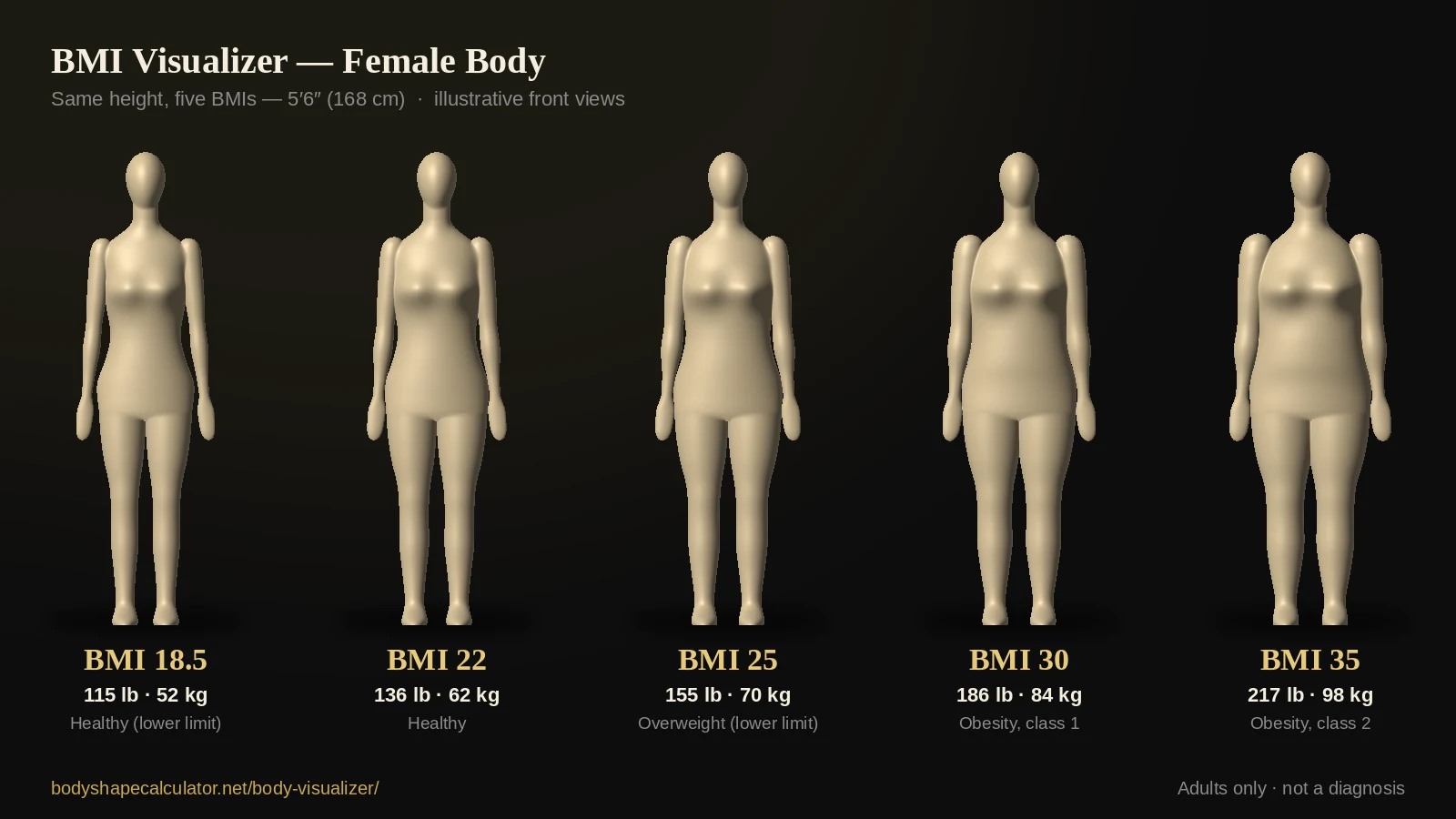
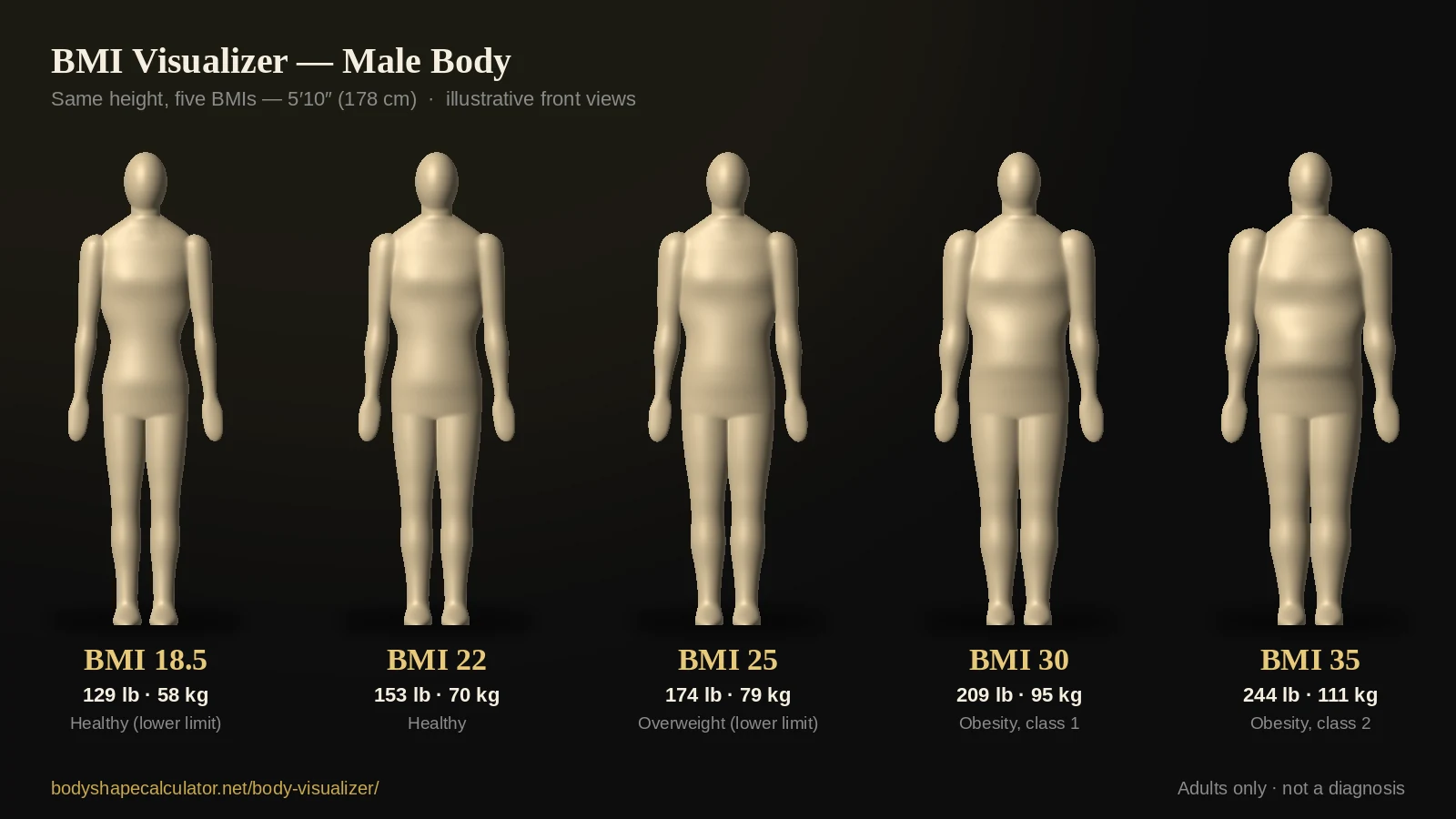
What BMI 20 looks like at 5′6″
For a woman who is 5′6″, a BMI of 20 is about 124 lb (56 kg). To see it, choose Female, switch to in / lb, and enter 66 in and 124 lb. The table shows other common BMI values at the same height.
| BMI | Weight at 5′6″ | kg | CDC adult category |
|---|---|---|---|
| BMI 18.5 | 115 lb | 52 kg | Healthy weight (lower limit) |
| BMI 20 | 124 lb | 56 kg | Healthy weight |
| BMI 22 | 136 lb | 62 kg | Healthy weight |
| BMI 25 | 155 lb | 70 kg | Overweight (lower limit) |
| BMI 30 | 186 lb | 84 kg | Obesity, class 1 |
| BMI 35 | 217 lb | 98 kg | Obesity, class 2 |
Healthy weight range by height
This table converts the CDC’s healthy BMI range (18.5 to 24.9) into pounds and kilograms for common adult heights.
| Height | cm | Healthy weight range (lb) | kg |
|---|---|---|---|
| 4′10″ | 147 cm | 89–119 lb | 41–54 kg |
| 4′11″ | 150 cm | 92–123 lb | 42–56 kg |
| 5′0″ | 152 cm | 95–127 lb | 43–57 kg |
| 5′1″ | 155 cm | 98–132 lb | 45–59 kg |
| 5′2″ | 157 cm | 101–136 lb | 46–61 kg |
| 5′3″ | 160 cm | 105–140 lb | 48–63 kg |
| 5′4″ | 163 cm | 108–145 lb | 49–65 kg |
| 5′5″ | 165 cm | 111–149 lb | 51–68 kg |
| 5′6″ | 168 cm | 115–154 lb | 52–70 kg |
| 5′7″ | 170 cm | 118–159 lb | 54–72 kg |
| 5′8″ | 173 cm | 122–164 lb | 56–74 kg |
| 5′9″ | 175 cm | 125–168 lb | 57–76 kg |
| 5′10″ | 178 cm | 129–173 lb | 59–78 kg |
| 5′11″ | 180 cm | 133–178 lb | 61–81 kg |
| 6′0″ | 183 cm | 137–183 lb | 62–83 kg |
| 6′1″ | 185 cm | 140–189 lb | 64–85 kg |
| 6′2″ | 188 cm | 144–194 lb | 66–88 kg |
| 6′3″ | 190 cm | 148–199 lb | 67–90 kg |
| 6′4″ | 193 cm | 152–204 lb | 69–92 kg |
U.S. averages, for context
Averages describe a population, not a target. According to the CDC’s National Center for Health Statistics, measured average adult height, weight and waist circumference in the United States (2021–2023) are:
| U.S. adults 20+ (CDC, 2021–2023) | Height | Weight | Waist |
|---|---|---|---|
| Men | 68.9 in (about 5′9″) | 199.0 lb | 40.6 in |
| Women | 63.5 in (about 5′3.5″) | 171.8 lb | 38.5 in |
The visualizer’s default figure is a typical body at a healthy BMI, not the U.S. average, so your first result may look leaner or fuller than the numbers above suggest. BMI also has limits: it cannot tell muscle from fat, so pair it with waist measurements and, if you are concerned, ask a health professional. Your bone structure matters too: the body frame size calculator shows whether you have a small, medium or large frame, which changes what a healthy weight looks like on you.
Body Proportions Explained: The Ratios Behind the Figure
Body proportions are the relationships between your measurements: how wide your shoulders are compared with your hips, how small your waist is next to them, how long your legs are compared with your torso. Proportions, more than size, decide body shape, and the visualizer calculates the ones that matter most.
| Ratio | How it is calculated | Reference point | Where you see it |
|---|---|---|---|
| Waist-to-hip ratio (WHR) | Waist ÷ hips | WHO: above 0.90 (men) or 0.85 (women) indicates abdominal obesity | Live analysis “Waist / hip” |
| Waist-to-height ratio (WHtR) | Waist ÷ height | Keeping your waist under half your height (below 0.50) is a common rule of thumb; 0.40–0.49 is the commonly cited healthy range | Live analysis “Waist / height” |
| Bust or chest – waist – hips | Differences in inches between the three | Sets the body shape: hourglass, pear, apple, rectangle, trapezoid, oval and more | Live analysis “Shape” |
| Leg-to-torso (inseam ÷ height) | Inseam ÷ height | The visualizer’s default inseam is about 45% of height; a longer inseam means a shorter torso at the same height | Advanced measurements → Inseam |
| Shoulder-to-hip balance | Shoulder width compared with hip width | Broad shoulders with narrow hips read as inverted triangle or trapezoid; the reverse reads as pear | The figure itself (front view) |
Worked example: the default female model at 5′5″ (165 cm) has a 29-inch (74 cm) waist and 38-inch (96 cm) hips, so its waist-to-hip ratio is 74 ÷ 96 = 0.77 and its waist-to-height ratio is 74 ÷ 165 = 0.45. Change any measurement and both numbers update instantly. You can also use our waist-to-hip ratio calculator and waist-to-height ratio calculator for a full write-up of each ratio, or the body proportions calculator to see every ratio at once.
Is there an ideal body proportion?
There is no single ideal. Classical ratios such as the golden ratio, a waist-to-hip ratio near 0.7 or the proportions of Leonardo’s Vitruvian Man reflect cultural taste, not health. Health research focuses on how much of your size sits around the waist compared with your hips and height. The visualizer describes your proportions; it does not grade them.
Male and Female Body Visualizer: What’s Different?
The female and male models are not recolored copies of each other. They differ where real bodies typically differ, so a male body visualizer result looks like a man and a female body visualizer result looks like a woman:
| Feature | Female model | Male model |
|---|---|---|
| Shoulders and neck | Narrower, more sloped shoulders; a slimmer, longer neck | Broader shoulders with rounded deltoids; a thicker neck and fuller trapezius |
| Chest | Narrower rib cage with bust volume that shows in the front, ¾ and side views | Wider, flatter chest with subtle pectoral shading |
| Waist and hips | Wider hips relative to the waist; pronounced glutes in the side and back views | Narrower hips, flatter glutes and a straighter torso |
| Legs | Thighs that meet at the top; slimmer knees and calves | Fuller thighs and calves with a slight thigh gap |
| Head, hands and feet | Smaller, with a narrower jaw | Larger, with a squarer jaw |
The Neutral model sits halfway between the two. In Compare mode every body has its own model, so you can compare a woman and a man of different heights and weights in one view.
Body shapes the visualizer recognizes
As a body shape visualizer, the live analysis names your shape with the same rules as our calculators. For women there are seven: hourglass, top hourglass, bottom hourglass, pear (triangle), apple, inverted triangle and rectangle. For men there are five: trapezoid, inverted triangle, triangle, oval and rectangle, explained in the male body type calculator. The Try a shape chips set the model to each pattern so you can see it.
If you picture a lean, athletic or muscular physique, raise shoulder width, chest, upper arm and thigh while keeping the waist small. The visualizer draws those proportions, though it cannot show muscle definition.
Compare Two Bodies: Height and Weight Comparison, Before and After
Compare A/B draws two figures side by side at the same scale and camera angle. Overlay lays body B as an outline over body A so every difference stands out. Both modes add a table of changes below the tool.
- Height and weight comparison: set each body’s model, height and weight to see how two people compare.
- Before and after: copy A to B, change B’s weight or measurements, and see the difference.
- Measurement change: try a waist that is 2 inches smaller, or hips 1 inch larger, and watch the ratios move.
- Progress tracking: save a share link or image each month and compare them later.
Weight loss simulator and weight gain visualizer
To preview a weight change, choose Compare A/B, tap Copy A→B, then change B’s weight. With Auto-balance on, the other measurements rescale with it. For muscle gain, raise chest, shoulder width, upper arm and thigh instead of weight.
Use goal outlines carefully. A goal body is a reference, not a target or an ideal. The visualizer does not draw bodies below BMI 16 and shows a note when a body falls in the underweight range. The CDC describes gradual, steady weight loss of about 1 to 2 pounds per week as the pace most likely to be maintained. Talk with a doctor or registered dietitian before setting a weight goal.
Body Visualizer vs. AI Body Generators and 3D Scanners
Searches for a “body generator”, “body maker” or “body creator” return three very different kinds of tools:
| Approach | What you give it | Strength | Limitation |
|---|---|---|---|
| AI body generator | A text prompt or a photo | Photorealistic images | Not tied to your real measurements; results cannot be verified, and uploading photos raises privacy questions |
| 3D body scan or statistical body model | A scan, or many measurements | Detailed shape from trained scan data | Needs special capture or heavy software, and usually offers no analysis |
| Measurement-driven visualizer (this tool) | Height, weight and tape measurements | Instant, private and repeatable — the same inputs give the same figure — with BMI, ratios, shape and compare mode | A simplified mannequin: it cannot show muscle or exact fat distribution |
This is not an AI body generator. It does not guess your body from a photo, and it never receives one.
How Accurate Is the Body Visualizer?
- The figure is illustrative. It shows the body your numbers describe, not a scan of you.
- BMI is a screening measure. The CDC notes that it should be considered with other factors when assessing health; it cannot separate muscle from fat.
- Body fat is an estimate. It uses the U.S. Navy circumference method (Hodgdon and Beckett, 1984), which can be off by several percentage points for an individual.
- Adults only. BMI categories apply to adults 20 and older. Children and teens need age- and sex-specific percentiles, and pregnancy changes the picture too.
- Not medical advice. If a number worries you, ask a health care professional, and read our disclaimer.
Privacy: nothing is uploaded
Everything runs in your browser. Your measurements are not sent to a server or stored, no account is needed, and downloaded images are created on your device. The share link keeps your numbers after the # symbol in the address, which browsers do not send to websites. Our privacy policy covers the details.
Body Visualizer FAQ
What is a body visualizer?
A body visualizer (also spelled body visualiser) is an online tool that turns your height, weight and body measurements into a rotatable human figure, so you can see what those numbers look like. Some people call it a body simulator or a 3D body model tool. This one is free, runs in your browser, and also shows BMI, waist-to-hip ratio, waist-to-height ratio, an estimated body fat percentage and your body shape.
Is this body visualizer free? Do I need to sign up?
It is completely free, with no signup and nothing to install. Open the page, enter your numbers and use it. Nothing you enter is uploaded or stored.
What does my body look like at a certain height and weight?
Enter your height and weight and the model draws a typical body for those numbers, with Auto-balance filling in the other measurements. For a closer match, add your bust or chest, waist and hips. To see two possibilities side by side, such as 150 lb and 165 lb at 5′6″, use Compare A/B or Overlay.
Is it a real 3D body visualizer? Can I rotate the model?
Yes. The figure is built from body cross-sections and rotates 360°. Use Front, ¾, Side and Back, drag the figure, press Spin, or use the arrow keys. It is an illustrative model rather than a scanned mesh, which keeps it fast, private and easy to compare.
Can I use it as a female or male body visualizer?
Yes. Choose Female, Male or Neutral under Model. The models differ in shoulders, neck, chest, waist, hips, glutes, legs, hands and feet, and the body shape names follow our female and male calculators. In Compare mode each body has its own model, so you can compare a woman and a man.
Is this an AI body generator?
No. It is a measurement-driven simulator: the same inputs always produce the same figure. It does not use AI to guess your body, does not ask for photos and never receives any.
How do I compare two bodies or do a height and weight comparison?
Choose Compare A/B. Use the Edit A and Edit B tabs to set each body’s model, height, weight and measurements. Both figures are drawn to the same scale and angle, and a table shows every change. Choose Overlay to lay B’s outline over A.
Can I use it as a weight loss simulator?
You can preview a before and after: copy your current body to B, lower B’s weight and let Auto-balance rescale the measurements. Treat the result as a rough reference, not a target. The visualizer will not draw bodies below BMI 16, and the CDC describes steady loss of about 1 to 2 pounds per week as the pace most likely to be maintained. Ask a doctor or registered dietitian before setting a goal.
Which measurements do I need?
Only height and weight to start. For a better match, add bust or chest, waist and hips. Shoulder width, inseam, neck, upper arm and thigh are optional. The measuring table on this page shows where to place the tape.
What is BMI and how is it shown here?
BMI is weight divided by height squared (pounds ÷ inches² × 703, or kg ÷ m²). For adults 20 and older the CDC labels a BMI under 18.5 as underweight, 18.5 to 24.9 as healthy weight, 25 to 29.9 as overweight and 30 or higher as obesity. It is a screening measure, not a diagnosis, and it cannot tell muscle from fat.
How accurate is the body fat estimate?
It uses the U.S. Navy circumference method, which needs height, neck and waist (plus hips for women). Individual results can be off by several percentage points, so use it to watch trends rather than as a medical measurement.
Is my data saved or uploaded?
No. All calculations and drawing happen in your browser. The Copy share link button puts your numbers in the link itself, after the # symbol, which browsers do not send to a server. Downloaded images are created on your device.
Does the body visualizer work on iPhone and Android?
Yes. On phones the model and the live analysis sit together in one pinned box at the top, so you can move the sliders below and watch the figure and numbers update. Drag the figure to rotate it.
Why doesn’t the figure look exactly like me?
The model is drawn only from the numbers you enter, so it cannot see muscle, bone structure, posture or where your body carries fat. Re-check your measurements, fill in the advanced fields, and remember that two people with the same measurements can look different.
What is the difference between the body visualizer and the body type calculator?
The body type calculator names your shape from bust or chest, waist and hip measurements. The visualizer works like a 3D body shape calculator: it draws a body from those numbers and more, and shows the same shape name live, so you can see your shape as well as read it.
Sources and References
- Centers for Disease Control and Prevention. Adult BMI Categories.
- National Center for Health Statistics, CDC. FastStats: Body Measurements (Anthropometric Reference Data for Children and Adults: United States, August 2021–August 2023).
- World Health Organization. Waist Circumference and Waist–Hip Ratio: Report of a WHO Expert Consultation, Geneva, 8–11 December 2008 (published 2011).
- Hodgdon JA, Beckett MB. Prediction of Percent Body Fat for U.S. Navy Men and Women from Body Circumferences and Height. Naval Health Research Center, 1984 (Reports 84-11 and 84-29).
- Centers for Disease Control and Prevention. Healthy weight guidance: gradual, steady weight loss of about 1 to 2 pounds per week.